Voice to Content AI: The Complete Guide to Transforming Speech Into Published Content in 2026
You have ideas. Lots of them. They surface during client calls, on the commute, between meetings. The problem is turning those fleeting insights into content that actually gets published. That's where voice to content AI changes the game for B2B founders and busy professionals in 2026.
Instead of staring at a blank page, you record a quick voice note. The AI transcribes it, structures it, and generates a draft you can validate and publish—often in minutes. This guide walks you through how voice to content AI works, compares the leading tools available today, and offers practical workflows for LinkedIn posts, blog articles, and beyond.
What Is Voice to Content AI and How Does It Work?
Voice to content AI goes far beyond simple audio to text conversion. While basic transcription software captures spoken words, voice to content platforms layer in natural language processing and content generation to transform raw speech into structured, publishable material.
Here's the core technology stack at play:
- Speech recognition AI converts your audio input into text with high accuracy, handling accents, pauses, and filler words.
- Natural language processing (NLP) analyzes the transcript for meaning, context, and intent—not just what you said, but what you meant.
- Content generation models restructure the text into coherent formats: social posts, blog drafts, scripts, or newsletters.
The result? A 3-minute voice note can become a week's worth of LinkedIn post drafts, each preserving your perspective and ready for your review before going live.
Why B2B Founders and Content Creators Are Adopting Voice Powered Content Creation
For founders running lean teams, voice powered content creation solves several problems at once:
- Time savings: Speaking is faster than typing. A quick voice capture during a commute or between meetings replaces hours of writing.
- Breaking through blank-page syndrome: When you talk through an idea, words flow more naturally than when you stare at a cursor.
- Maintaining authentic voice: Content automation tools can drift toward generic output—but starting with your own spoken words anchors the content in your real perspective.
- Consistent publishing cadence: Hands-free content creation means you can feed your LinkedIn or blog with fresh material every week without hiring a content team or burning out.
The business case is simple: stay visible, build trust, and prove you're thinking deeply about your market—all without letting content production consume your calendar.
How Voice to Text Content Creation Actually Works: From Recording to Published Draft
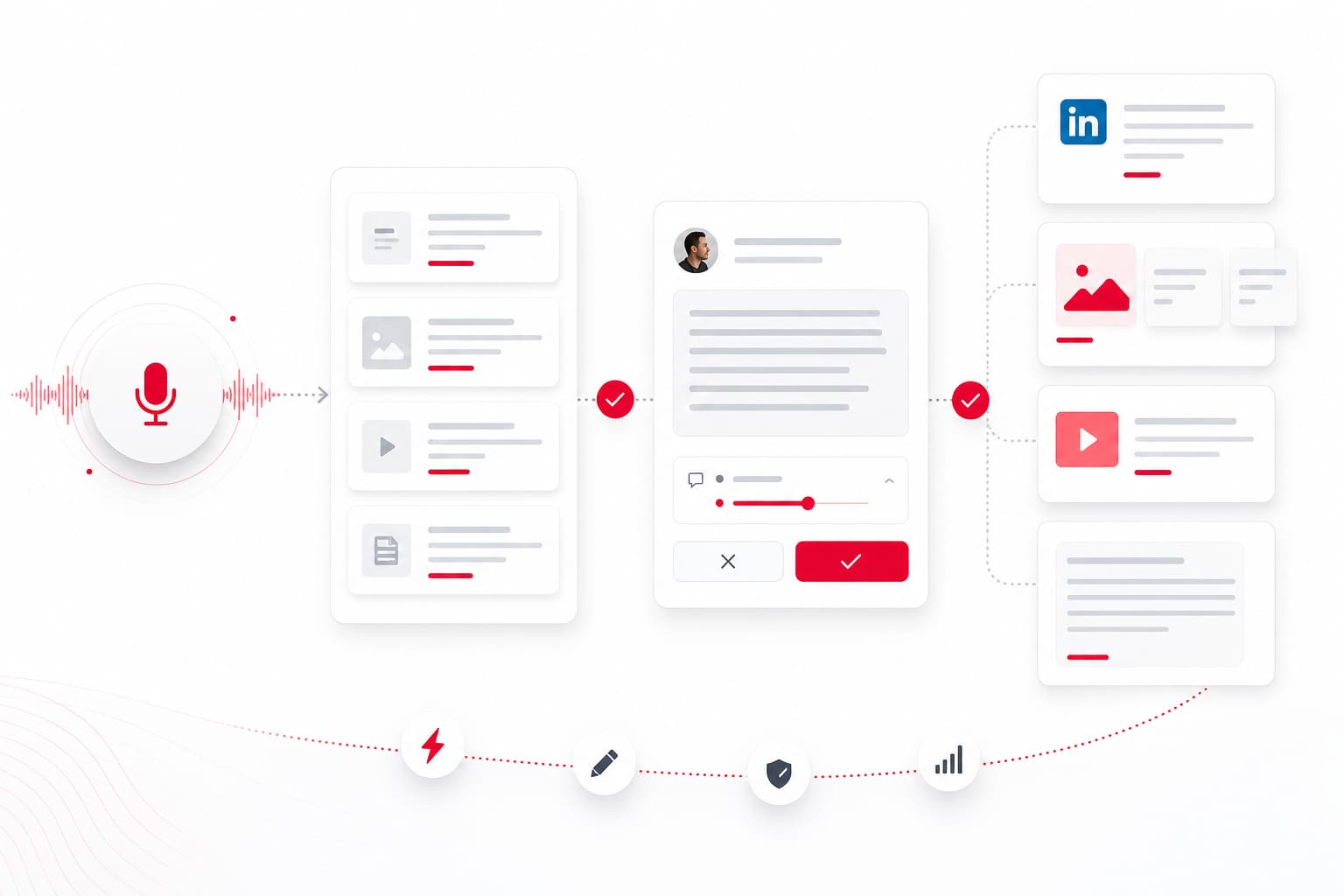
Let's break down a typical voice to text content creation workflow, step by step:
1. Capture Your Voice Note
Use your phone, a web app, or a dedicated voice dictation tool. Speak naturally—share an anecdote from a client call, a lesson from a product decision, or a signal you noticed in your market.
2. AI Transcription
The speech to content AI transcribes your audio in real time or within seconds. Top tools in 2026 handle multiple languages, accents, and technical vocabulary with high accuracy.
3. Content Structuring
The AI analyzes your transcript and organizes it into a format: a LinkedIn post with a hook and call-to-action, a blog article with headings, or a short video script. It identifies key points, removes filler, and proposes structure.
4. Human Validation and Editing
This step is non-negotiable. Review the draft, adjust the tone, add specifics, and confirm it sounds like you. Supervised workflows keep your content credible and on-brand.
5. Publishing or Scheduling
Once validated, the content goes into your publishing queue. Some platforms integrate with LinkedIn, CMS tools, or email schedulers for seamless distribution.
Example: You spend 3 minutes on a voice note about a pricing lesson from your latest sales conversation. The AI generates three LinkedIn post drafts. You review, pick one, tweak the hook, and schedule it for Thursday. Total time invested: under 10 minutes.
Top AI Voice Content Generator Tools in 2026: Features, Pricing, and Use Cases
The market for AI voice content generator tools has matured. Here's a quick comparison of leading solutions as of mid-2026:
| Tool | Primary Strength | Formats Supported | Language Support | Pricing (approx.) |
|---|---|---|---|---|
| YALG | Supervised workflow for B2B founders; validation-first | LinkedIn posts, carousels, blogs, short scripts | Multi-language | Free tier, Pro from $39/mo |
| Otter.ai | Transcription-first, meeting notes | Transcripts, summaries | EN, ES, FR, DE, JP | Free tier, Pro from $16.99/mo |
| Descript | Audio/video editing with transcription | Podcasts, video scripts, show notes | EN, multi-language beta | Free tier, Pro from $24/mo |
| Castmagic | Podcast/audio repurposing | Show notes, social clips, blog drafts | EN, multi-language | From $29/mo |
| Notion AI + voice integrations | Hybrid note-taking + content | Notes, docs, drafts | Multi-language | Bundled with Notion AI |
Key distinctions:
- Workflow-focused platforms like YALG prioritize human validation before publishing, making them a fit for founders who want to protect their voice and credibility.
- Transcription-first tools (Otter, Descript) excel at capturing and editing audio but require more manual work to turn transcripts into finished content.
- Hybrid solutions blend note-taking, transcription, and generation—useful for teams who already use a particular productivity stack.
Accuracy, Language Support, and Integration: What to Evaluate Before Choosing a Tool
Before committing to an AI voice transcription tool, run through this checklist:
- Transcription accuracy: Test with your actual voice, accent, and vocabulary. Accuracy above 95% is the baseline for professional use, but industry jargon can trip up generic models.
- Multi-language support: If your audience or team works in multiple languages, verify real-world accuracy—not just claimed language coverage.
- Integrations: Does the tool connect with your CMS, LinkedIn, email platform, or scheduling tools? Seamless handoffs save time.
- Human validation features: Look for approval workflows, editing interfaces, and the ability to reject or revise AI output before publishing.
- Content automation flexibility: Can you customize output formats? Define tone? Exclude certain topics?
A practical approach: record a 2-minute voice note covering a real topic, run it through your shortlisted tools, and compare the outputs side by side.
Workflow Optimization: Matching Voice to Content AI to Your Content Type
Different content formats demand different approaches. Here's how to adapt your voice to text content creation workflow:
LinkedIn Posts
- Keep voice notes short (1-3 minutes).
- Focus on one idea per note: a lesson, a story, a question.
- Let the AI draft a hook and call-to-action; edit for punchy opening lines.
- Validate tone and specificity before scheduling.
Long-Form Blog Articles
- Record a 5-10 minute walkthrough of your main points.
- Use the AI to generate an outline, then expand each section.
- Add data, links, and examples during editing.
- Review for structure, not just grammar.
Podcast Show Notes and Video Scripts
- Transcribe the full episode or recording.
- Use AI to extract highlights, timestamps, and key quotes.
- Edit for clarity and context—listeners and readers have different needs.
Voice Commands for Content
Some tools support voice commands for content editing: "Make this punchier," "Add a question at the end," or "Summarize in three bullets." Experiment to find what fits your workflow.
Free vs. Premium Voice to Content Solutions: Finding the Right Fit for Your Workflow
Free tools can be a starting point, but there are trade-offs:
Free tiers typically offer:
- Limited transcription minutes per month
- Basic formatting and export options
- Minimal integrations
- Less accurate language/accent support
Premium/subscription platforms provide:
- Higher accuracy and faster processing
- Advanced formatting (carousels, scripts, multi-format output)
- Publishing integrations and scheduling
- Approval workflows and team collaboration
- Priority support and ongoing model improvements
For hands-free content creation at scale, premium solutions pay for themselves in time saved. If you're testing the waters, start with a free tier—but expect to upgrade as your publishing cadence grows.
Common Pitfalls and How to Avoid Generic AI Output
Voice to content AI is powerful, but it's not a set-and-forget solution. Watch out for these risks:
- Over-reliance on AI: Treating AI output as final content leads to generic, forgettable posts. Always review and edit.
- Losing your personal voice: The more you skip validation, the more your content drifts toward "AI-speak." Anchor drafts in real anecdotes and specifics.
- Publishing unvalidated content: Supervised workflows exist for a reason. A quick review catches errors, off-brand phrasing, or claims you didn't mean to make.
- Keyword stuffing: Let SEO keywords appear naturally. Forcing phrases like "ai content writing" into every paragraph hurts readability and credibility.
Best practices:
- Use AI to accelerate, not replace, your judgment.
- Edit for specificity: swap vague claims for concrete examples.
- Build a feedback loop: track which posts resonate, and adjust your voice notes accordingly.
Frequently Asked Questions
How accurate is voice to content AI for professional content creation?
Leading tools in 2026 achieve transcription accuracy above 95% for common languages and accents. However, industry-specific terminology and brand voice still benefit from human review. Treat AI output as a strong first draft, not a finished product.
Can voice to content AI maintain my personal writing style?
Yes—if you use supervised workflows. By starting with your own spoken words and validating every draft before publishing, you preserve authenticity. Raw AI output should always be treated as a draft, not final content.
What types of content can I create using speech to content AI?
Practical formats include LinkedIn posts, blog articles, newsletters, video scripts, and podcast show notes. Workflows differ: short-form content needs punchy, focused voice notes; long-form benefits from more detailed recordings and structured outlines.
Is voice to content AI suitable for non-English speakers or multilingual teams?
Most major tools support multiple languages, but accuracy varies by language and accent. Test your specific use case before committing to a platform. Some tools excel in English but lag in other languages.
How much time can I save using an AI voice transcription tool for content creation?
Realistic expectation: 3 minutes of voice input can generate a week of LinkedIn drafts. Editing and validation still require time—plan for 5-15 minutes per post, not zero. The real gain is breaking through writer's block and maintaining a consistent cadence without a content team.
Ready to Turn Your Voice Into a Content Pipeline?
If you're a B2B founder looking for a supervised, hands-free approach to content creation, consider testing a workflow-focused tool like YALG. Capture your ideas in voice, validate the drafts, and publish with confidence—without losing your authentic voice along the way.
See YALG in action or start your 14-day Pro trial to generate your first week of LinkedIn posts from a single voice note.